
AgentTeamsAI
చాలా తక్కువ చేసి చాలా సాధించండి
మీరు Boss, agents మీ టీమ్. అవి tasks ను తామే తీసుకుంటాయి, ఒకదానికొకటి message చేస్తాయి, code review చేస్తాయి. మీరు kanban board చూస్తూ coffee తాగొచ్చు.
మద్దతు ఉన్న AI ప్రొవైడర్లు
- 75+
- ప్రొవైడర్లు
- 200+
- మోడల్లు
- Claude Code
- Codex
- OpenCode
- Cursor
- SuperGrok
- GitHub Copilot
- Z.AI
- MiniMax
- Kiro





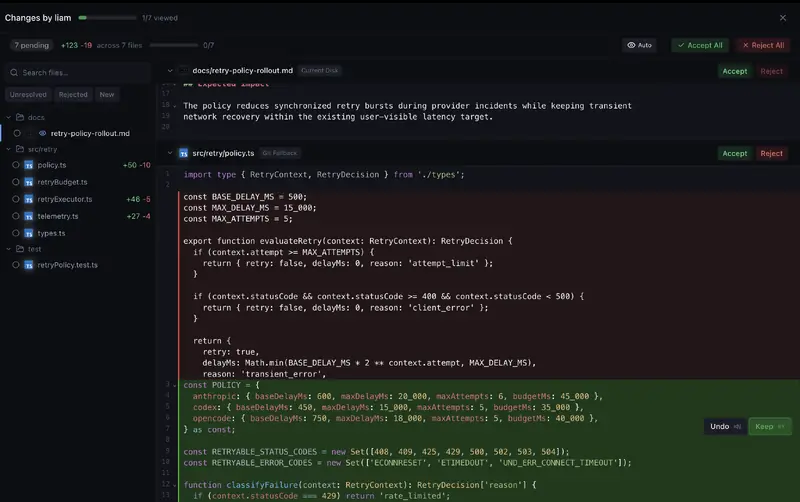
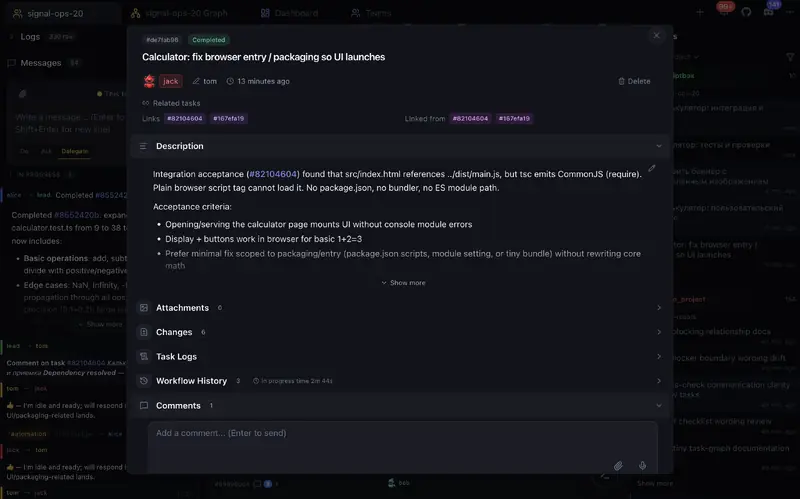
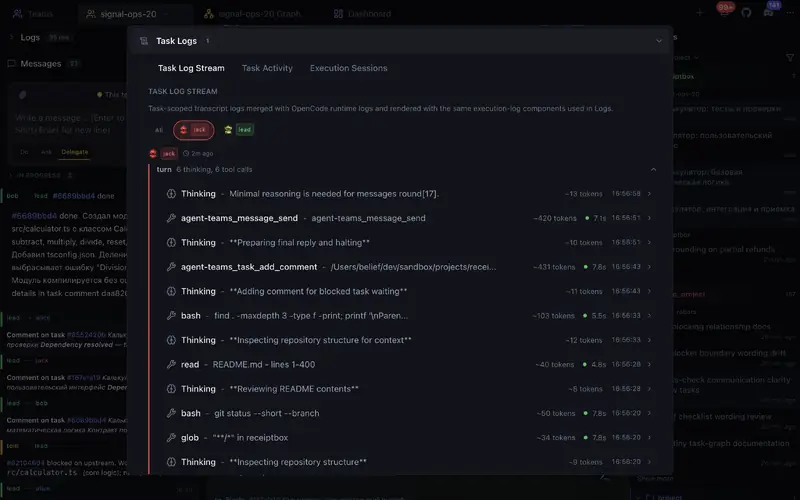
దీన్ని చర్యలో చూడండి
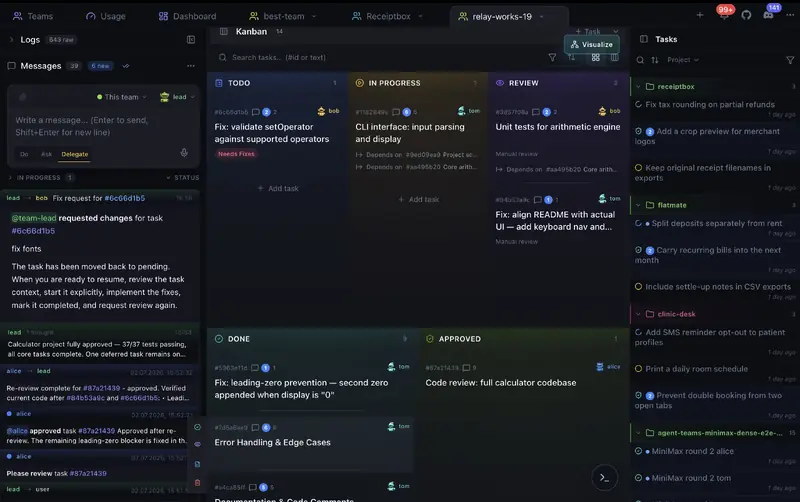
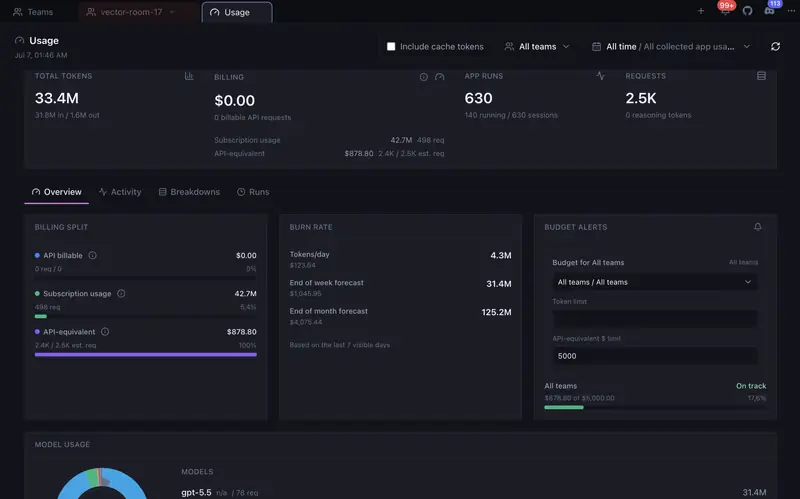
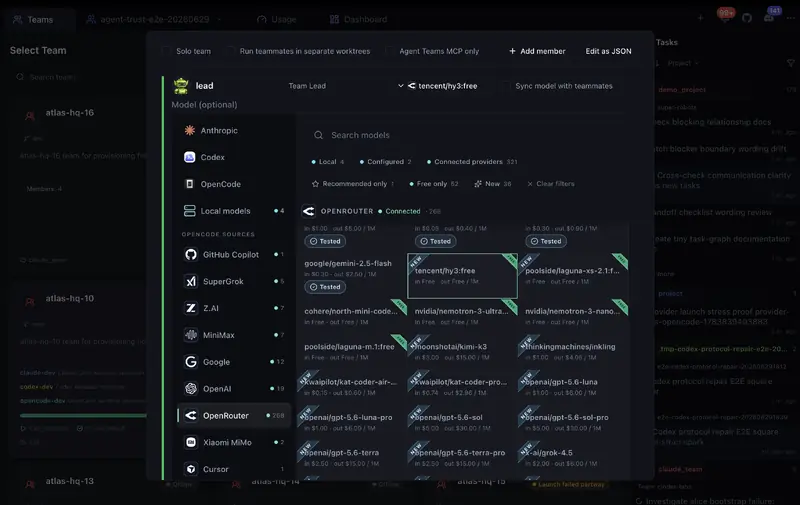
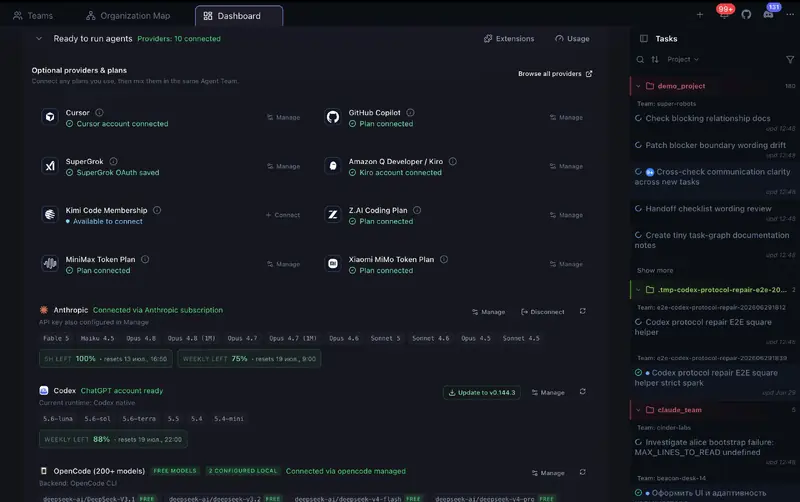
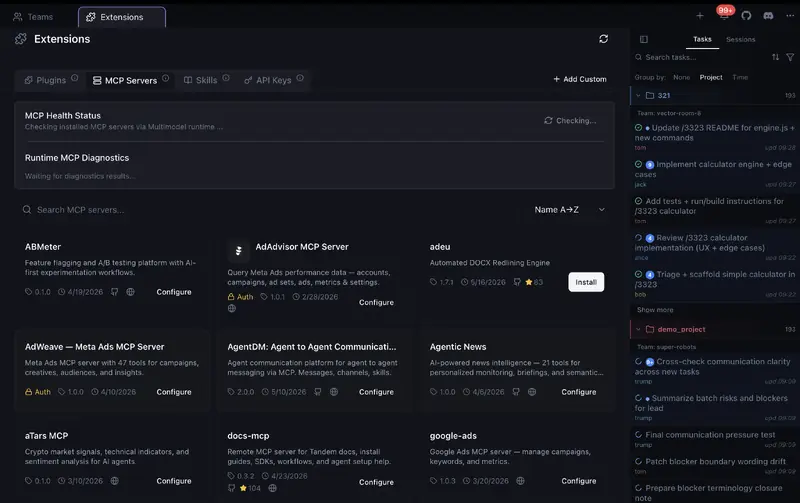
యాప్ నుండి నిజమైన స్క్రీన్షాట్లు — kanban బోర్డు, కోడ్ సమీక్ష, ఏజెంట్ టీమ్లు మరియు మరిన్ని.
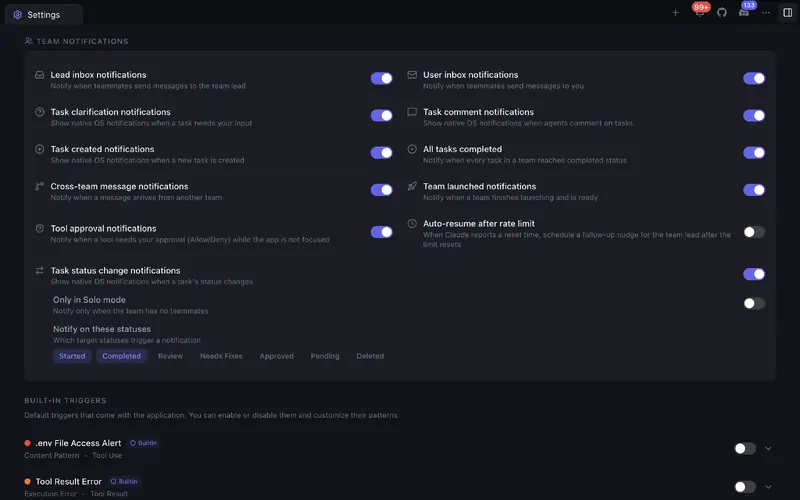
AI ఏజెంట్ ఆర్కెస్ట్రేషన్ కోసం మీకు కావలసినదంతా
మల్టీ-ఏజెంట్ సహకారాన్ని నిజంగా పనిచేసేలా చేసే శక్తివంతమైన సాధనాలు.
Agent టీమ్లు
వేర్వేరు roles తో టీమ్లు సృష్టించండి. Agents parallel గా autonomous గా పని చేస్తాయి, మాట్లాడుకుంటాయి, టీమ్ల మధ్య collaborate చేస్తాయి.
Kanban board
Agents పని చేస్తుండగా task status realtime లో మారుతుంది. Drag, assign, review - అన్నీ ఒక visual board లో.
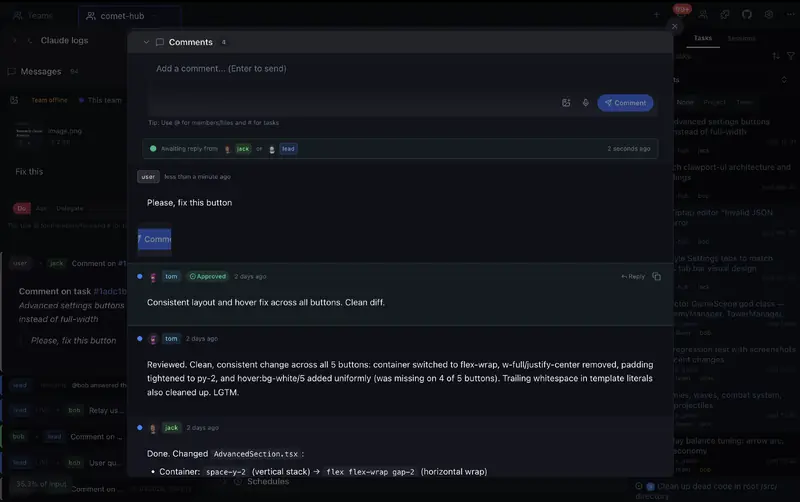
Code review
ప్రతి task కి diff view, accept, reject, comment. Git support తో built-in code editor.
టోకెన్ విశ్లేషణ & బడ్జెట్లు
టీమ్లు, ఏజెంట్లు, టాస్క్లు, ప్రాజెక్ట్లు, మోడల్లు మరియు రన్లలో టోకెన్లు, అంచనా ఖర్చు ఎక్కడ వినియోగమవుతున్నాయో చూడండి. ఖరీదైన పనిని గుర్తించండి, ట్రెండ్లు మరియు అంచనాలను ట్రాక్ చేయండి, నెలవారీ బడ్జెట్లు సెట్ చేసి 80% మరియు 100% వద్ద అలర్ట్లు పొందండి.
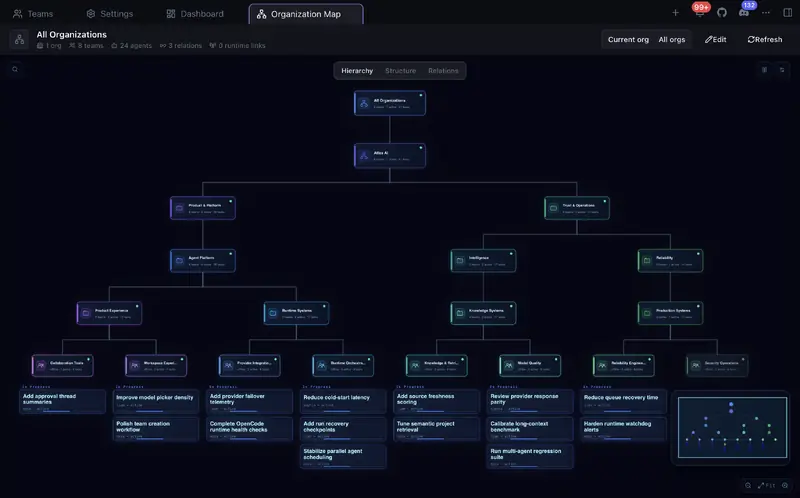
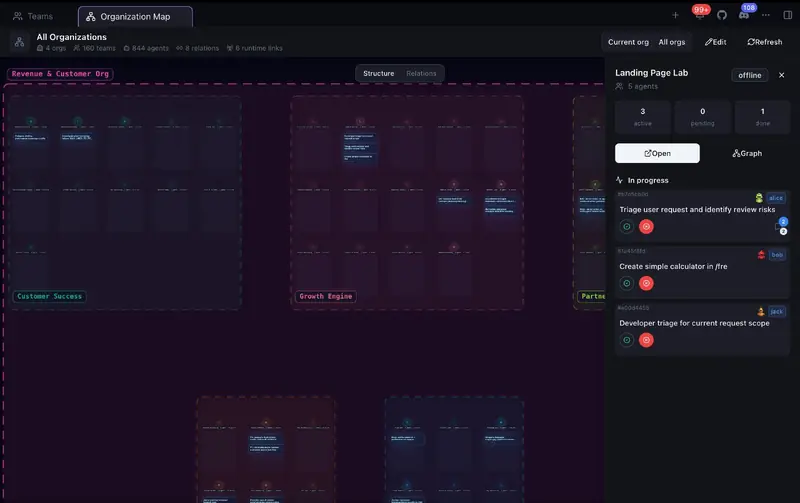
సంస్థలు & గ్లోబల్ అవలోకనం
టీమ్లను విభాగాలు, స్క్వాడ్లు లేదా ఏ నెస్టెడ్ నిర్మాణంలోనైనా ఏర్పాటు చేయండి. ఒకే లైవ్ మ్యాప్లో అన్ని సంస్థలు, టీమ్ మరియు ఏజెంట్ స్థితులు, టాస్క్ పురోగతి, డిపెండెన్సీలు, డెలిగేషన్ మరియు టీమ్ల మధ్య కమ్యూనికేషన్ను చూడండి.
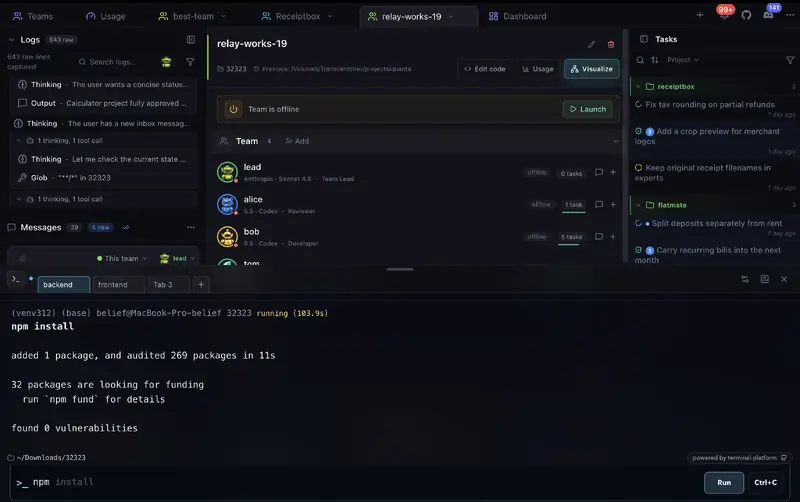
Terminal
Team మరియు local shells, history, autocomplete, settings ఉన్న visual terminal workspace లో commands run చేయండి.
టీమ్ల మధ్య కమ్యూనికేషన్
Agents ఒకే టీమ్లోనూ, టీమ్ల మధ్యనూ message చేస్తాయి. Direct messages, task comments, quick actions.
Solo mode
తన tasks తానే నిర్వహించే ఒక agent తో ప్రారంభించండి. మరింత power కావాలంటే full team గా విస్తరించండి.
Download
మీ platform ఎంచుకుని AI agent teams తో build చేయడం మొదలుపెట్టండి.
macOS
Apple Silicon / IntelWindows
64-bit / ARM64Linux
64-bitమేము ఎలా పోల్చబడతాము
ఇతర AI కోడింగ్ సాధనాలతో ఫీచర్-బై-ఫీచర్ పోలిక.

| ఫీచర్ | Agent Teams | Gas Town | Paperclip | Cursor | Claude Code CLI |
|---|---|---|---|---|---|
| బృంద స్వయంప్రతిపత్తి | ✓█████████░ 9/10Live agents plan, delegate, work, and review together | ✓████████░░ 8/10Persistent teams with coordination and recovery | ◒███████░░░ 7/10Durable scheduled and event-triggered agents, less live peer teamwork | ◒██████░░░░ 6/10Parallel agents + subagents, no peer team | ◒███████░░░ 7/10Experimental teams + cross-session messaging; recovery limits |
| సౌకర్యవంతమైన స్వయంప్రతిపత్తి | ✓Per-action approvals, roles, and notifications | ✓Gates, roles, escalation, and recovery | ✓Board approvals, roles, pause, and stop | ◒Command controls and admin policies | ✓Permissions + hooks |
| లైవ్ టీమ్ మ్యాప్ | ✓Teammates, tasks, blockers, handoffs, activity, logs | ◒Agent tree + feed panels | ◒Org chart/status, not a task/log map | ◒Agents Window, no shared peer-team map | ◒Terminal team panel, no graphical UI |
| టీమ్ వర్క్స్పేస్ | ✓Tasks, code, terminal, review, and teammates in one app | ◒Mail/feed/dashboard across tools | ◒Board + task chats, less live teammate view | ◒Agents Window, no peer team workspace | ◒Terminal agent view, no graphical workspace |
| జీరో సెటప్ | ✓Start free, no signup or API key | ✗Manual CLI stack | ◒npx onboarding + browser app | ◒App install + account | ◒CLI + env flag |
| టీమ్మేట్ లాంచ్ స్థితి | ✓Clear ready/stuck status with launch diagnostics | ✓Working, stalled, and failed health with recovery controls | ◒Run status and orphan recovery | ◒Agent status in Agents Window | ◒Agent view statuses, logs, stop/respawn in terminal |
| Kanban బోర్డు | ✓5-column task board with review states and drag-and-drop ordering | ✗Dashboard, not Kanban | ✓7 columns, drag-and-drop | ✗ | ✗ |
| సమీక్ష వర్క్ఫ్లో | ✓Built-in Changes viewer with file/hunk accept, reject, edit, undo, and feedback | ◒Merge queue, no diff UI | ◒Review gates, not inline code review | ✓Local Agent Review + PR Bugbot | ◒Agent review, no review UI |
| క్రాస్-టీమ్ కమ్యూనికేషన్ | ✓Direct agent messages and shared task links across teams | ◒Mailboxes + handoffs | ◒Comments + @mentions | N/A | ◒Cross-machine/cloud session messaging, no shared cross-team task graph |
| లింక్ చేయబడిన టాస్క్లు | ✓Tasks can link to and block each other | ✓Task deps + grouped work | ✓Goals, parent tasks, blockers | ✗ | ✓Shared task list |
| సెషన్ విశ్లేషణ | ✓Agent messages, tool calls, timeline, token use, and cost | ◒Session recall, feed, metrics | ◒Run transcripts + cost audit | ◒Agent chat, diffs, artifacts, and cloud diagnostics | ◒Transcripts, background logs, /usage, and /insights |
| సంస్థలు & గ్లోబల్ అవలోకనం | ✓Nested organizations with live team, task, relation, and communication map | ◒Roles + escalation, no org chart | ✓Org chart + board governance | ◒Team admin only | ✗ |
| మిశ్రమ AI టీమ్మేట్లు | ✓Provider-aware teams with per-member models and mixed OpenCode side lanes | ✓Many providers, terminal-first | ✓Bring your own agents/runtimes | ◒Multi-model parent + subagents, no peer team | ◒Claude-only experimental teams |
| బడ్జెట్ నియంత్రణలు | ✓Monthly budget alerts + optional cap for supported scheduled one-shot runs | ◒Cost tiers + digest, no hard caps | ✓Per-agent budgets + hard stops | ✓User/team spend caps + cloud-agent spend limits | ✓Org/member spend limits + print-mode hard cap |
| Git worktree ఐసొలేషన్ | ✓Optional separate workspace per teammate | ✓Core primitive | ✓Worktrees / branches | ✓Agents Window worktrees | ✓Built-in for sessions and subagents |
| టెర్మినల్ | ✓Built-in visual terminal for team and local commands | ◒Terminal-based workflow, no built-in terminal | ◒Runs commands, no interactive terminal | ✓Built-in IDE terminal | ◒Runs in your terminal |
| అంతర్నిర్మిత కోడ్ ఎడిటర్ | ✓With Git support | ✗ | ✗Control plane, not editor | ✓Full IDE | ✗ |
| టాస్క్ అటాచ్మెంట్లు | ✓Auto-attach, agents read & attach | ✗Not task-level | ✓Docs, attachments, work products | ◒Prompt context, not task attachments | ◒Prompt files/images, not task attachments |
| ధర | FreeOSS + free model with no auth, paid providers optional | FreeOSS, runtime plans needed | FreeOSS, self-hosted + infra | Free + paid usage | Claude plan or API usage |
Agent Teams product facts checked in local source on September 22, 2026; competitor sources checked on September 22, 2026: Agent Teams organizations feature, Agent Teams mixed-provider team lanes, Agent Teams cross-team messaging, Agent Teams Kanban board, Agent Teams terminal workspace, Agent Teams token usage budgets, Agent Teams budget alerts, Agent Teams scheduled budget cap, Agent Teams runtime/provider readiness detection, Agent Teams local provider autodetection, Agent Teams Solo Mode, Agent Teams Changes viewer, historical research notes (June 25, 2026), Gastown README, Gastown provider guide, Gastown scheduler, Gastown dashboard source, Gastown release, Paperclip README, Paperclip adapters, Paperclip heartbeat protocol, Paperclip org chart, Paperclip OrgChart source, Paperclip budgets, Paperclip runtime services, Paperclip Kanban source, Paperclip work products, Paperclip release, Cursor terminal, Cursor Cloud Agents, Cursor Agent Review, Cursor Bugbot, Cursor worktrees, Cursor Agents Window, Cursor subagents, Cursor Models & Pricing, Cursor Team Pricing, Cursor pricing, Claude Code CLI, Claude Code agent teams, Claude Code cross-session messaging, Claude Code worktrees, Claude Code subagents, Claude Code workflows, Claude Code costs, Claude pricing, Claude Code release.
ఇన్స్టాల్ చేయడానికి ఉచితం. ఉచిత మోడల్ చేర్చబడింది.
auth లేకుండా ఉచిత మోడల్తో వెంటనే ప్రారంభించండి - ఖాతా, API కీ లేదా క్రెడిట్ కార్డు అవసరం లేదు. మీకు మరిన్ని మోడల్లు కావలసినప్పుడు మాత్రమే Claude Code, Codex, OpenCode/OpenRouter, Cursor, SuperGrok, GitHub Copilot, Z.AI, MiniMax, Kiro లేదా ఇతర ప్రొవైడర్ యాక్సెస్ను కనెక్ట్ చేయండి.
Free
అవును. App free మరియు open source. Auth అవసరం లేని free model తో మొదలుపెట్టవచ్చు - registration, API key, credit card అవసరం లేదు. మరిన్ని models కోసం Claude Code, Codex, OpenCode/OpenRouter, Cursor, SuperGrok, GitHub Copilot, Z.AI, MiniMax, Kiro లేదా supported provider connect చేయండి.
- Agent టీమ్లు
- Kanban board
- Code review
- టీమ్ల మధ్య కమ్యూనికేషన్
- Solo mode
- Live processes
- నా code private గా ఉంటుందా?
- మొదలు పెట్టడానికి ఏమి కావాలి?
Agent Teams కు చెల్లింపు టైర్ లేదు. auth లేని ఉచిత మోడల్ దాన్ని వెంటనే ప్రయత్నించడానికి మిమ్మల్ని అనుమతిస్తుంది; చెల్లింపు ప్రొవైడర్ వినియోగం ఐచ్ఛికం మరియు మీరు ఎంచుకున్న ప్రొవైడర్ ద్వారా నియంత్రించబడుతుంది.
ప్రశ్నలు ఉన్నాయా? మా దగ్గర సమాధానాలు ఉన్నాయి
Agent Teams గురించి మీరు తెలుసుకోవలసినదంతా